




Verify Trisquel 12
- Inicie sesión o regístrese para enviar comentarios

Referring to https://trisquel.info/en/wiki/verify-trisquel-download
Where does one find the .asc file? Is there a published sha256sum for Ecne?

Step 1: Go to https://trisquel.info/en
Step 2: Click on Download from the top bar
Step 3: Choose your Trisquel
Step 4: Click on Download ISO.
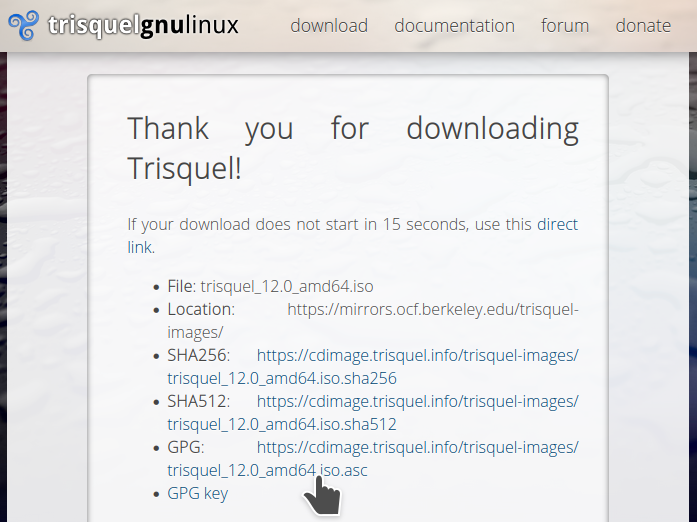
Step 5: When the "Thank you for downloading Trisquel!" page is loaded, notice the links to the SHA256 and to the SHA512 and to the .asc.
Step 6: Click on those links to get them.
OK, thanks jxself, clear and concise. I did steps 1 -4 but for step 5 I did 'fail to notice the links to the SHA256 and to the SHA512 and to the .asc.' ;)

For this question, I can confirm what jxself said above by following the exact steps given. There must be a web page saying "Thank you for downloading Trisquel!" and you will see some links to File:, Location:, SHA256:, SHA512:, GPG:, and finally, GPG. In my picture below, you can also see my hand icon pointing it out.
Hello. Did you mean to access the cdimage server of Trisquel? If so, please visit https://cdimage.trisquel.info/trisquel-images and you will find .asc and .sha256 files there along with the .iso files.
Sincerely yours,
Malsasa
Thanks Malasa, I also "can confirm what jxself said above by following the exact steps given." :}