




I need an M2 B-key Wi-Fi module | No information on the h-node.org website
- Vous devez vous identifier ou créer un compte pour écrire des commentaires

Hello everyone.
Please could you tell me whether the Wi-Fi module with an M2 B-key interface is single-band or dual-band? Unfortunately, there is no such information on the h-node.org website. I recently discussed the Atheros AR9462 module; if you look at the h-node.org website, there is no information about the keys, and this is very important information before making a purchase. If anyone has access to the website, please add this information to the homepage
interface:not-specified https://h-node.org/wifi/catalogue/en/1/1/undef/undef/undef/undef/wifi-works/undef?search_string=AR9462&submit=Search
If I'm not mistaken, the Atheros AR9462 has an E key and an A key, but no B key

"Could you tell me whether the Wi-Fi module with an M2 B-key interface is single-band or dual-band?"
This question's unanswerable. The M.2 is just the physical connector shape. Knowing that provides no information about the radio. It's like knowing a light fixture uses a standard screw-in socket. That tells you the bulb will physically fit, but tells you absolutely nothing about whether the bulb is a dimmable LED, or what color it is.
"I recently discussed the Atheros AR9462 module"
This is the part you need. The AR9462 is dual-band.
"If I'm not mistaken, the Atheros AR9462 has an E key and an A key, but no B key"
That's because the A and E keys are standardly used for WiFi, while the B key is usually used for storage, and B-key WiFi cards are rare. Given the rarity, are you sure that your computer really does use that for the WiFi and has no available A or E key that could be used instead? If your computer really does use that, and there aren't any A or E slots to use instead, I would recommend getting an M.2 Key B to Key A+E Adapter and then using one of the standard WiFi cards.
Hello Jason,
Thank you so much for your reply and for being willing to help.
I hope I have enough money to cover your expenses )))
As for the Wi-Fi module with the B key, I agree with you—the E Key is often used, but modern single-board computers use this interface as a universal one, including for 4G modules, when the board has two M.2 interfaces or one M.2 and a second miniPCIe.
As for a 4G module for the M2 B Key, I've found a great option: the Sierra AirPrime EM7455 4G LTE (blob-free)
But I haven't been able to find a Wi-Fi module for the M2 B Key...
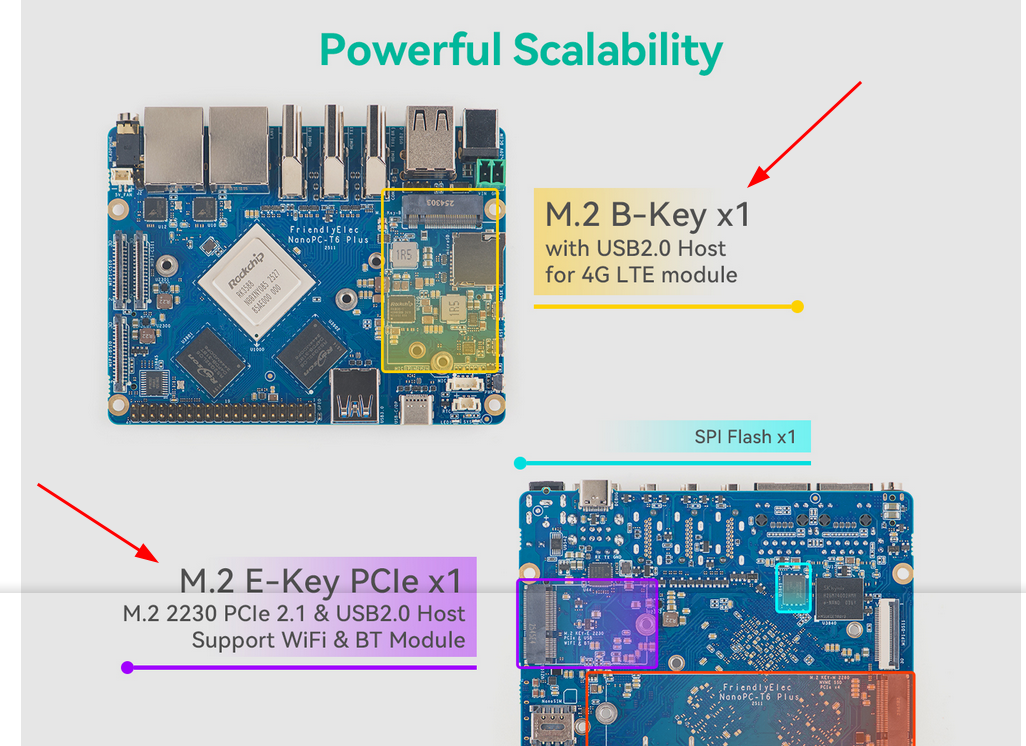
Doesn't that picture show the presence of E key? Use that. But if not, get the kind of adapter I mentioned so you can plug an A or E key into the B key. Problem solved.
Thank you for your reply.
As for the adapter, that’s an optional solution; I was aware of that option.
The photo was just an example to help explain what I mean.
Right, if there isn’t a Wi-Fi module with a B key, then we’ll have to use an adapter.