




T12 installed
- Anmelden oder Registrieren um Kommentare zu schreiben

Welcome back, my Trisquel friends. The site has been down here for a couple of days. I hope it was nothing serious.
I just finished a clean install of T12. A long struggle. But T12 is running and my data is transferred (despite several USB sticks failing.)
My Thinkpad X200 is no longer crashing, except when I send an email attachment containing an image. Icedove immediately crashes to a logon screen. (I suppose this is an improvement over my old crashes which were all to a restart condition.) I have used Synaptic to reinstall Icedove, but it still crashes.
I have tried emailing various images files, but had only crashes. I have my Linux Mint Chromebook as a backup, and my web -and Thunderbird-
are working fine. Any suggestions welcome.

You might try running icedove in the terminal via strace.
'strace icedove'
'strace -Z icedove' might only spit out system failures.
Thanks Geshmy. That did produce a wildly fast-scrolling terminal terminal output, at least. I'm not sure how or why, but Icedove stopped crashing for a moment. Then it started crashing again.
I also tried running Icedove in the Troubleshooting mode. No use - it crashed. Any different ideas welcome.
Multiple kern.log complaints like this--
2026-08-24T17:45:32.153448-05:00 0em-thinkpad kernel: audit: type=1400 audit(1787611532.150:168): apparmor="AUDIT" operation="userns_create" class="namespace" info="Userns create - transitioning profile" profile="unconfined" pid=9642 comm="icedove" requested="userns_create" target="unprivileged_userns"
2026-08-24T19:39:45.678416-05:00 0em-thinkpad kernel: audit: type=1400 audit(1787618385.676:204): apparmor="ALLOWED" operation="open" class="file" profile="libreoffice-soffice" name="/home/oem-thinkpad/.icedove/installs.ini" pid=12202 comm="pool-soffice" requested_mask="r" denied_mask="r" fsuid=1000 ouid=1000
Strace output for 5 minutes.
| Anhang | Größe |
|---|---|
| strace.odt | 59.82 KB |
Would this work?
You can open up a two windows in your filemanager and put them side by side and have one at new home directory and the other at OEM-Thinkpad home directory and begin copying the latter and pasting to the other directory by directory. Of course you have to navigate in both windows in sync.
Then you can delete the OEM-Thinkpad directory.
So newhome/Music in one, OEM-Thinkpad/home/Music in the other with focus on the that one, Ctrl - A to select all, Ctrl -C to copy then focus on first window and Ctrl -V to paste. Or use Edit on the menu bar for each window. I just had to do this using pcmanfm.
Thanks Geshmy. This would work, but I was hoping for something less risky. It took forever to transfer this data with USB 2.0!
Actually, I think usb 2.0 will be slow but now that is there on your hard drive it will be much faster. Anyway, good luck. Maybe some of the strong coders that stop in here have an answer for you.
I just realized there is an easier faster way using the two windows.
Have the first showing your home directory.
Put the second window in OEM.../Music.
Focus on OEM window > Ctrl A to select all
Then Click and hold on any one of the selected items and
drag it to the Music folder in the first window until the Music Directory is highlighted.
Repeat for each directory in The OEM... folder.
That way all the system has to do is change the path to the data you have already copied to the hard drive.
Geshmy-thanks!
Glad I could help!
Well, the system is running smoothly BUT still crashing randomly. I ran all hardware tests including memtest86+ from a rescue USB PASSED, testdisk PASSED, stressapptest PASSED, stress ng PASSED, tested power supply for 24 hrs without battery-no problem. I did the X11 fix. It worked fine. I am now out of hardware tests, so I am running another distro from a live USB to see how that works. The only hardware fault in the logs is an mce error indicating that Libreboot is installed. Any suggestion welcome!
Maybe it needs a cleaning. A long time ago I had similar problem resolved on an old PC by removing the case and cleaning it with a can of compressed air. Other than that, I don't know. Would be nice to resolve this as random crashes aren't good.
Thanks Geshmy. I am going to bite the bullet and replace the thermal paste and thermal pad in my X200 this week. (There is a thermal pad on the GPU, but it seems that most people don't replace it. I bought some just in case.) I'll take the opportunity to inspect the electrolytic and tantalum caps on the board. And do a thorough cleaning. I may well break something, but Thinkpad parts are cheap. Wish me luck.
re 'I may well break something'
Take your time and exercise all caution :)
Success! The re-pasted the CPU on my venerable X200. I didn't even break anything. While I was at it, I installed a replacement wifi card and performed a thorough cleaning.
I was a bit concerned when the computer was eerily silent at startup. But the fan was running at a very low speed. CPU is running much cooler, about 50C degrees after a 15 minute Youtube video. Fan speed is generally much lower.
The old thermal grease, which is what Lenovo called it in the manual, was sloppily applied by the previous tech. It cleaned up easily. I replaced the thermal pad which was intact but about 25% too big.
Pix attached. Thanks!
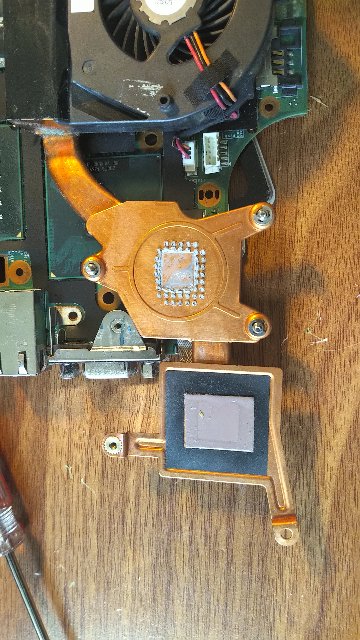
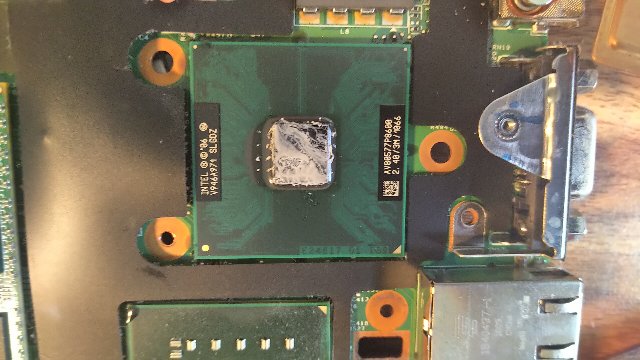
Nice! I see that laptops do shutdown when they overheat so hopefully you will be all good now.
As part of my re-pasting project, I noticed that my HDD was from 2013. This spurred me to finally buy an SSD, a Kingston A400 with 480 gb. I also bought a USB enclosure for the HDD/SDD.
I haven't cloned a drive in probably 15 years, so I am being careful.
I have a System Rescue USB stick and could clone the disk using ddrescue. Or I could (1) do a fresh install of Trisquel and (2) move my Home directory to the new disk. Which would be better?
Thanks!
_____________________
Edit- I opted for a completely clean install of Trisquel and copied my Home directory to the new SSD. Everything works. The machine is running cool now. Thus ends the saga. Thanks!


I haven't cloned a drive in probably 15 years, so I am being careful.
Don't you regularly (weekly if not daily) back /home up? You definitely should. I personally use Back In Time. Trisquel ships it by default. With Back In Time, every snapshot is a directory in the backup. That said, you should not simply use the graphical file manager to copy its content to /home on the new SSD. I did that. It works, but every file then bears the date of that operation. I believe using 'cp -a' in a terminal would preserve the dates.

I just want to say congratulations! And thank you. As a silent reader, I could learn so much from your thread. Your photo of the internal machine of your laptop was impressive.
Sincerely yours,
Malsasa
Thanks Magic Banana. I opted to reinstall Trisquel from a USB stick and the transfer my Home directory via another USB stick. It worked, kinda, but I am still tinkering. My X200 is running cool, but a strange issue cropped up today. Icedove crashes to the login screen whenever I email my sister, who is on gmail. Weird thing is, I can email my own gmail account from Icedove and it works fine. My webmail works fine when I email my sister's gmail account.
I thought it was the Xorg screen tearing issue because I had not yet reinstalled the fix. I just reinstalled it, and Icedove still crashes - but only when emailing my sister. Still trying to figure this out.
As far as backups, I don't have one I can trust right now. I only have a copy of my Home directory on a USB stick, and my old HDD in a USB enclosure. This is clearly suboptimal. I had been using Backups feeding my Google drive, but the Backup ballooned to near 200 gigs. My Home directory is a small fraction of this size. I had a setting wrong. So I am looking for a new backup solution, maybe NAS of some kind. I am open to any suggestions!
Edit--
I solved the Icedove crashes by deleting all instances of my sister's email from the address book. There were six. One must have been corrupt. Also bought a 500gig USB drive for $22 from an auction site. That drive will be my backup via USB or perhaps as NAS if I put it on my router.
Malsasa- Thank you for your kind words! I take many photographs so I can put things back together correctly.
Since you have an interest, here are some additional photos. The first photo shows my old Thinkpad X200 with the keyboard removed-
- The fan is on the top left.
- The HDD is on the right, marked 2013. It easily unplugs, so I replaced it with a new SSD.
- The BIOS battery is the bright yellow thing in the lower middle.
- Moving to the right along the bottom edge (2d photo) is a black rectangular block marked MP Note. This is one of the stereo speakers.
- Just above the speaker is a small board marked MAC and various numbers. It has two wires, a black one and a white. This is the Wifi card. It is held in by two screws.
The last picture shows part of a 1953 Vacuum Tube radio receiver I recently finished rebuilding in my Enchanted Workshop. I like working on old junk!


